Let a camera do the counting and checking.
Detection, counting, inspection and reading text on photos or video, from the pictures your team already takes. Trained on your own images, and run on your own phone, laptop or edge box.
Live detection demo
Runs entirely in your browser. Pick a photo, then run it.
Your image is processed on this device and never uploaded. This page has no upload address; the file is read by your browser and forgotten when you leave.
The first run downloads the model once (about 9 MB).
Hides detections below this confidence. The photo is not analysed again.
Counting
No results yet.
- Inference time
- –
- Model load
- –
Every detection, as a list
| # | Object | Confidence | Left, top |
|---|---|---|---|
| No results yet. | |||
The demo uses a general-purpose model trained on everyday objects; a client project trains on your own images. Model: SSDLite MobileNet v2, trained on the COCO dataset (80 kinds of everyday objects), running with TensorFlow.js.
The research behind it
The demo is a general model. A project model learns your crop.
Adjie's master's research at Tamkang University (Computer Science and Information Engineering) trains detectors to find each tomato in a greenhouse photo and grade how ripe it is. The paper has been submitted; results will be shared once it is published.
- YOLO-family object detectorsEach tomato found and graded in one pass
- A Swin Transformer-based YOLOv11A transformer backbone inside a YOLOv11 detector
- Ensembles fused with Weighted Boxes FusionSeveral detectors' boxes combined into one answer
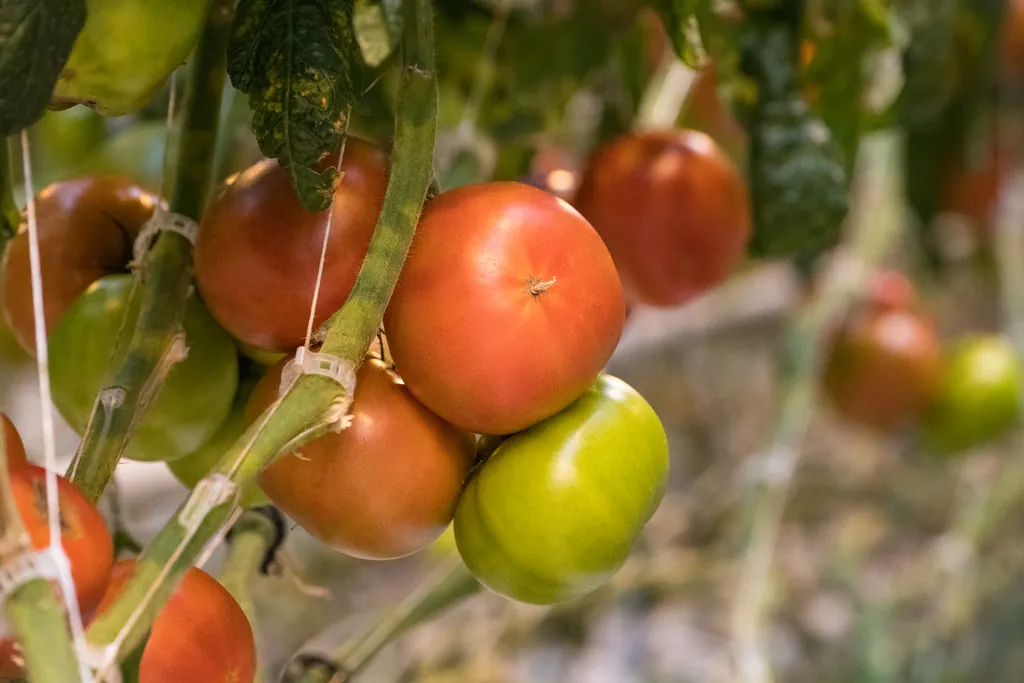 Illustration, not model output
Where someone looks, then writes down what they saw.
Computer vision fits jobs that are repetitive, visual and already photographed, or easy to photograph. Some typical ones:
-
01
Fruit ripeness grading on farms and plantations
Sorting harvested fruit, or fruit still on the plant, into ripeness grades from photos, so grading is the same from one picker or shift to the next.
- Camera sees
- Fruit in crates, on a belt or on the plant
- You get
- A count per grade, per photo or per batch
-
02
Counting items on a line or a shelf
Counting products, packs, seedlings or parts as they pass a camera or sit on a shelf, instead of counting by hand and typing the number in.
- Camera sees
- A conveyor, a tray, a shelf or a storage rack
- You get
- Counts by type, with the photo kept as a record
-
03
Visual defect checks
Flagging items with a visible fault, such as a crack, a dent, a missing part or a wrong label, so a person only checks the ones that were flagged.
- Camera sees
- Each item at a fixed spot, in steady light
- You get
- Pass or flag, with the area that caused the flag
-
04
Reading gauges, labels and forms in labs and clinics
Reading a dial or a display, a printed label or a filled-in form from a photo, and putting the value into a log, so nobody copies numbers by hand. Not diagnosis: see the limits below.
- Camera sees
- A gauge, a sample label or a paper form
- You get
- The reading or text, ready to check and save
How a computer vision project runs
You only pay for a pilot once the check on your own photos says it can work.
- 01
Feasibility check
You send a sample of your own photos, taken the way you would on a normal day. I test what can be detected and write up what a pilot would need. Paid, and short.
- 02
Pilot model
A model trained on your labelled images, tested on photos it never saw in training, with the results written down plainly.
- 03
Simple dashboard
A small web screen to take or upload photos, see the boxes and counts, correct mistakes and export the results.
- 04
Hand-over
The model runs on your hardware: a phone, a laptop or an edge box on site. You get the model files, the code and the documents.
Feasibility check
Starting priceUS$400
Starting price, final quote after the brief.
- Tests on a sample of your own photos
- A written answer: what works, what doesn't yet, and why
- What a pilot would need: photos, labels, hardware, scope
Computer vision pilot
Starting priceUS$2,000
Starting price, final quote after the brief.
- A model trained on your own labelled images
- A simple dashboard for photos, counts and corrections
- Runs on your phone, laptop or edge box, with hand-over docs
What I won't promise, and won't do
Plain limits, so the project is judged on your data and not on a sales page.
No accuracy promises before seeing your data
How well a model works depends on your photos: light, angle, distance and how different the things are from each other. Any number before the feasibility check would be a guess, so you won't get one.
Your data stays private
Your photos are used only for your project and are never shared or used to train anything else. Camera images that show people are personal data under Indonesia's Personal Data Protection Law (UU PDP, Law No. 27 of 2022), so we agree before the project how they are collected, stored and handed back.
No medical diagnosis
In labs and clinics the work stops at reading, counting and logging: gauges, labels, forms, stock. Nothing here diagnoses a patient, reads a medical image for findings, or makes a clinical decision.
Start with your own photos.
Tell me what the camera should find, count, check or read, and where the photos come from. The link opens your email app with those questions filled in.